
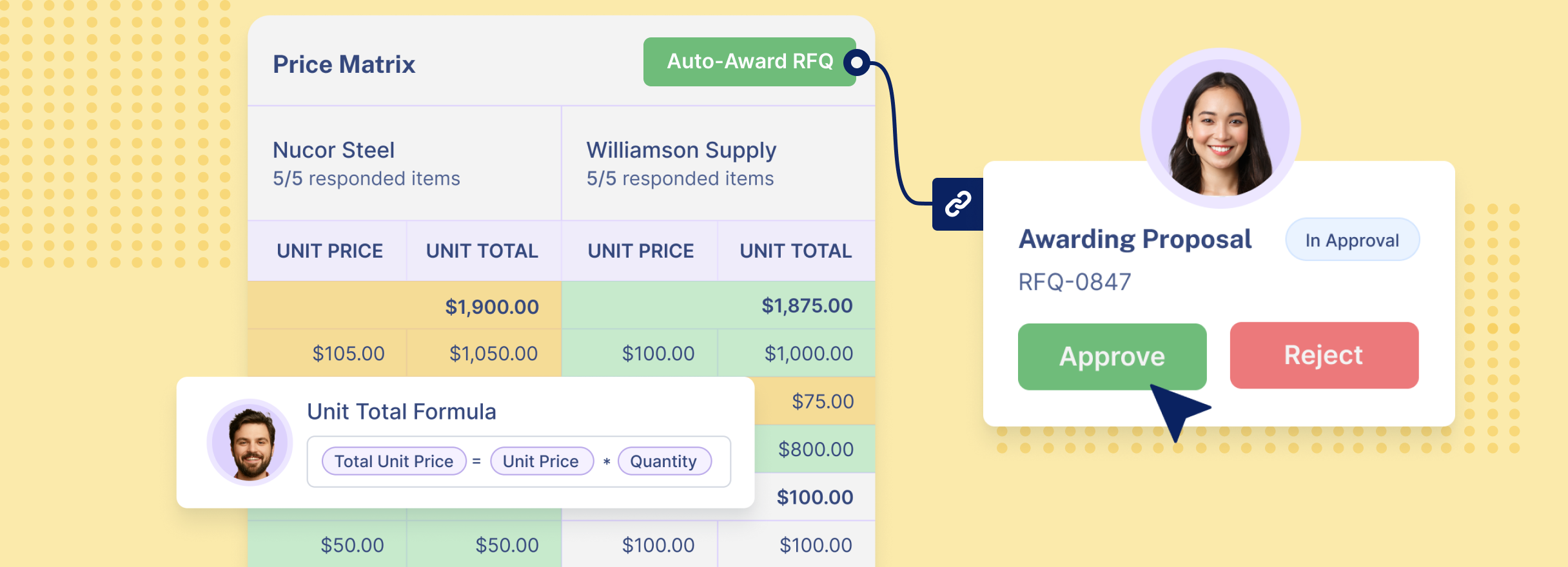
RFQ software is a procurement platform that helps a business run request-for-quote events with suppliers. It centralizes supplier invitations, quote collection, response tracking, quote comparison, approvals, negotiation rounds, award decisions, and the downstream creation of contracts or purchase orders.
RFQ software, also called request-for-quote software or supplier quoting software, is used to manage the process of asking suppliers for pricing and commercial terms. A buyer creates an RFQ, invites suppliers, collects responses, compares quotes, evaluates tradeoffs, awards the business, and often turns the winning quote into a contract or purchase order.
An RFQ is easy to start. A buyer writes down what the business needs, sends it to suppliers, waits for pricing, and chooses the best offer. The hard part begins after that first request goes out. Supplier responses arrive in different formats, some replies are late, and the newest price may live in someone else's inbox. By the time the team is ready to decide, the quote history can be scattered across people, files, spreadsheets, and conversations.
RFQ software is built to turn that scattered process into a visible workflow. It gives procurement, operations, sales, and purchasing teams one place to create RFQ events, manage supplier participation, compare offers, record the decision, and carry the result into the next purchasing step.
RFQ software is not just a digital form for requesting prices. A form can standardize the request, but the larger value comes from making supplier quoting trackable and visible from start to finish.
That starts with the supplier pool. In some cases, an RFQ is private: the buyer invites known suppliers who are already approved, onboarded, or under contract. In other cases, the RFQ can be public or open to a wider supplier network. That matters when the buyer does not already have enough supplier contacts, is sourcing a new category, or needs alternatives to existing suppliers. A public RFQ event can help the team discover suppliers it has not worked with before.
This is also where supplier onboarding becomes part of the RFQ workflow. Before a supplier can reliably participate, the business may need basic company information, tax details, certifications, compliance documents, payment information, insurance documents, or category qualifications. A strong RFQ platform should support onboarding before or during the invitation process, so new suppliers can move from discovery to participation without creating a separate manual chase.
The system should also support the reality that not every supplier will use a portal perfectly. If a supplier replies by email, sends a PDF, or provides pricing over the phone, the buyer should be able to add a quote on behalf of the supplier while keeping the response inside the RFQ record.
At its best, RFQ software creates one operating record for the event: who was invited, who responded, what changed during negotiation, who approved the award, what contract was created, and which purchase order was linked.
For teams that still rely on email and spreadsheets, the practical benefit is control. The team can see the full RFQ event instead of reconstructing it after the fact.
Most teams do not choose RFQ software because the first request is difficult. They choose it when the manual process starts creating operational friction. The signs are usually practical and familiar.
One supplier replies by email, another sends a spreadsheet, and another attaches a PDF. The buyer has to rebuild the comparison manually, and small updates can be missed.
A manager asks who has responded, and the answer requires checking inboxes, spreadsheets, supplier messages, and individual buyers. In a strong RFQ workflow, status should be obvious.
If buyers have to remember which suppliers have not replied, write reminder emails one by one, and resend invitations manually, the process depends too much on individual discipline. RFQ software should support automated follow-ups when a supplier has not responded, including reminders before the deadline, a second invitation if needed, and alerts when a quote is incomplete.
If the buyer chooses a supplier but then has to recreate the decision in a contract system, purchasing system, or ERP, the team loses time and creates room for errors. A modern RFQ workflow should carry the awarded quote into contract and purchase order creation.
Centralized quote collection is the foundation. Supplier responses should come into one RFQ event, not several inboxes and spreadsheet versions. Buyers should see invited suppliers, submitted quotes, missing fields, attachments, and updates in one place.
A useful platform should also let a buyer add a quote on behalf of a supplier. If a supplier sends pricing by email, PDF, or phone, the buyer can enter the response, attach the original file, and keep the quote inside the RFQ record.
A useful platform should also let a buyer add a quote on behalf of a supplier. If a supplier sends pricing by email, PDF, or phone, the buyer can enter the response, attach the original file, and keep the quote inside the RFQ record.
Supplier onboarding matters when the RFQ includes new suppliers or public supplier discovery. The platform should collect supplier profile data, tax information, required documents, qualifications, and approval status before the supplier is awarded business. If the RFQ event surfaces a strong new supplier, the buyer should be able to move that supplier toward approval without rebuilding the record somewhere else.
An RFQ dashboard should show which suppliers were invited, who opened the event, who declined, who submitted a complete or incomplete quote, and who is overdue. Automation should remind suppliers before deadlines, resend invitations when needed, and alert buyers when a response is incomplete.
An RFQ event dashboard gives buyers and managers a live view of invited suppliers, response status, countdown to deadline, unanswered supplier questions, quote completeness, evaluation status, negotiation round, award status, and next action. Without this dashboard, RFQ software can become just another database. With it, the platform becomes an operating tool.
Quote comparison should be easier than copying supplier prices into a spreadsheet. The system should align supplier responses by line item, price, quantity, lead time, delivery terms, payment terms, minimum order quantity, availability, and any custom evaluation criteria the team needs.
Some teams will want manual comparison, especially when the decision depends on context. Others will want configurable evaluation, with criteria, weights, and approval steps. The goal is not to let software choose blindly. The goal is to make the decision process consistent, visible, and easier to defend.
RFQ work often does not end with the first quote. Buyers may need revised pricing, updated lead times, alternative items, freight clarification, or best-and-final offers. If the platform cannot support multiple rounds, the process often moves back into email.
A strong RFQ platform should show the history of each round: what changed, which suppliers were invited to revise, what the previous quote was, what the new quote is, and who approved the next step.
The RFQ workflow should not stop at award. Once the team selects a supplier, the system should help turn that decision into the next commercial action. For WorkFish, that means the awarded quote can connect to contract management and purchase order creation.
This matters because many errors happen after the decision is made. If the buyer has to manually re-enter awarded pricing, supplier terms, item details, or quantities into another system, the organization risks mismatches between the quote, contract, and purchase order. Linking the RFQ to the contract and purchase order protects the record and gives the team a clearer audit trail.
Supplier communication is another important RFQ feature because questions, clarifications, updates, and negotiation messages often affect the final quote. A strong RFQ process should keep supplier communication in one place, connected to the specific RFQ, supplier, and quote version. This helps buyers avoid scattered email threads, missed clarifications, and inconsistent information shared with different suppliers.
Centralized communication also creates a clear record of what was asked, what was answered, when updates were sent, and whether suppliers received the same critical information. For buyers, this improves control and transparency. For suppliers, it reduces confusion and helps them submit more accurate, complete, and competitive responses.
RFQ reporting should show not only how sourcing activity is moving, but also how much value it creates. Buyers should be able to see estimated savings from competitive quoting, negotiated price reductions, supplier response rates, quote completion rates, RFQ cycle time, overdue RFQs, and how many RFQs converted into contracts or purchase orders. Strong reporting also helps teams compare awarded prices against initial quotes, track where better payment terms, delivery terms, warranties, or service levels were negotiated, and identify which suppliers consistently offer the most competitive total value.
For leadership, this visibility is critical. It shows whether teams are inviting enough suppliers, whether certain suppliers win unusually often, which categories take longest to quote, and where procurement is leaving money or better terms on the table. Over time, RFQ reporting becomes a practical way to measure sourcing performance, improve supplier competition, and prove the financial impact of procurement decisions.
Overall, RFQ software is a key element in supporting procurement’s top priority: cost savings. By making supplier competition more structured, transparent, and measurable, it helps teams compare quotes more effectively, negotiate better terms, reduce manual back-and-forth, and turn sourcing activity into clear financial value.
RFQ software gives everyone involved a clearer view of sourcing activity. Buyers can see supplier responses, managers can track delays and award decisions, and sales or operations teams can understand whether supplier pricing is ready before committing to customer timelines. Suppliers can also track their own participation through the supplier portal, which reduces uncertainty and unnecessary follow-up.
Manual RFQ work consumes time in small pieces: drafting the request, distributing it to suppliers, sending reminders, normalizing responses, building comparisons, and preparing award recommendations. RFQ software reduces the administrative work around these steps, helping buyers move from request to decision faster.
RFQ software helps buyers manage supplier participation more consistently. Teams can invite the right suppliers based on category, capability, location, compliance status, past performance, or qualification requirements. This makes it easier to include enough competition while keeping the process controlled and relevant.
Structured comparison helps buyers evaluate more than unit price. The lowest price may not be the best decision if lead time, minimum order quantity, delivery cost, payment terms, availability, or supplier risk changes the real value of the offer. RFQ software helps bring these details into one comparison view so buyers can make better-informed sourcing decisions.
RFQ software supports more objective supplier selection by keeping pricing, terms, delivery commitments, qualifications, and supporting documents connected to the same event. Instead of relying on informal judgment or scattered notes, teams can compare suppliers against the same criteria and make award decisions based on total value.
RFQ software records who was invited, who responded, what each supplier submitted, what changed during negotiation, who approved the award, and what happened after award. That accountability helps protect the company from informal decisions, undocumented supplier preference, and unclear approval logic.
When the winning quote can flow into a contract or purchase order, teams reduce duplicate data entry and lower the risk of using the wrong supplier, price, quantity, or commercial terms. The buyer can move faster because agreed data is already structured, and the company gets a clearer audit trail from quote to award to execution.
Choosing RFQ software is not only a feature comparison. It is a workflow decision. Procurement software often underperforms when companies underestimate process redesign, data quality, integrations, stakeholder alignment, and user adoption. Large software failures outside RFQ show the same pattern: when software does not fit the way the business works, teams lose time, users avoid the system, data becomes unreliable, and expected savings do not materialize.
The right RFQ software should make supplier quoting easier to control, easier to review, and easier to carry forward into purchasing. When the process is connected, teams spend less time chasing updates and re-entering information, and more time making clear, well-documented supplier decisions.
WorkFish was built for this kind of connected workflow. It helps teams manage RFQs as part of the purchasing process, not as a disconnected step that ends once a quote is awarded. From adoption to day-to-day use, WorkFish can help your team shape the system around your existing process and move toward a more structured, visible, and reliable way of managing supplier quotes.