
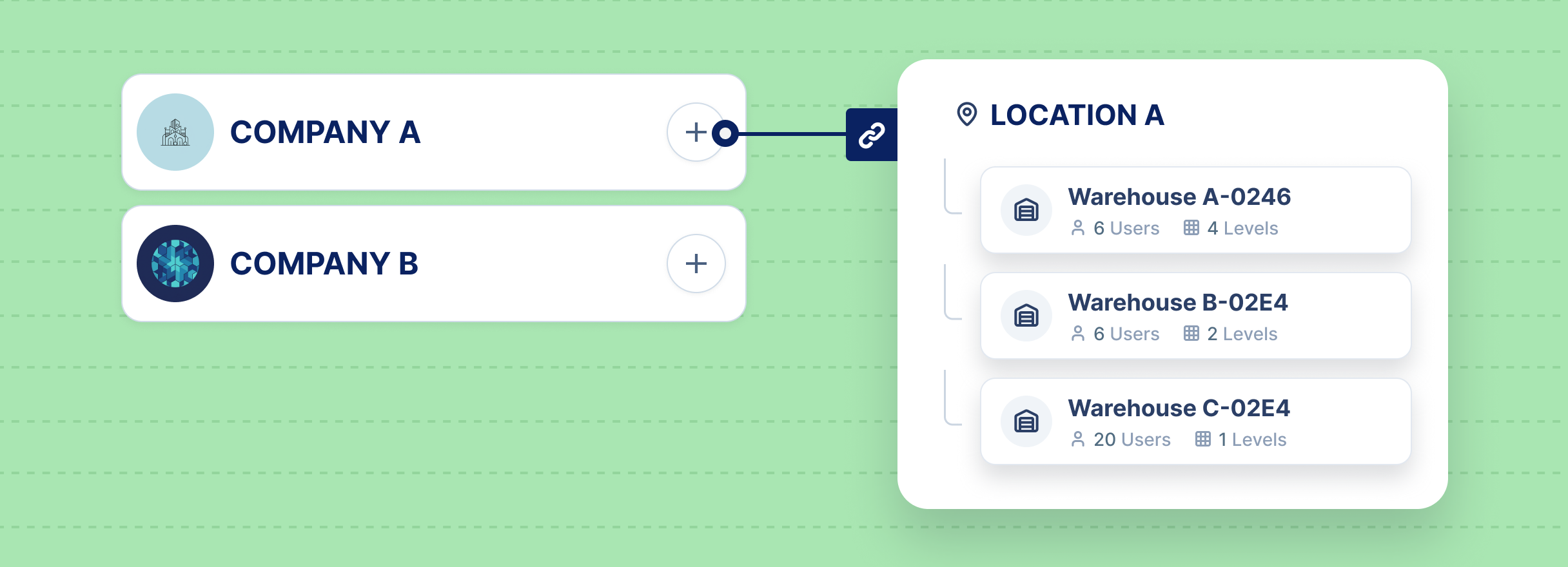
Multi-company purchasing software gives business groups one place to manage purchasing, without forcing every company into the same process. Workfish centralizes the workflow - purchase requests, approvals, RFQs, supplier management, reporting - in a single workspace. Each company still keeps its own structure underneath: its own locations, departments, and user permissions.
Purchasing rarely fragments all at once. It happens gradually. One company builds its own process. Another uses a different approval path. Suppliers get managed in scattered conversations instead of one system. Eventually leadership is left piecing together the group-wide picture after the fact.
Standard purchasing tools force a tradeoff between two bad options. Give every company its own separate account, and each company's setup stays accurate, but leadership loses shared visibility across the group. Squeeze the whole group into one flat, shared setup, and visibility improves, but the local structure each company actually relies on disappears: its own locations, its own approval rules, its own supplier relationships.
The hard part isn't deciding whether purchasing should be centralized or decentralized. Most multi-entity groups need both at once. Leadership needs shared visibility and consistent controls. Local teams need workflows that reflect their own locations, suppliers, and approval responsibilities. Lean too far toward central control, and local teams start working around the system. Give every entity its own disconnected process, and leadership loses buying leverage and confidence in the numbers. WorkFish is built around that balance - one shared backbone, with company-level detail still intact.
Multi-company purchasing software serves organizations where one purchasing process has to work for more than one business entity. It gives leadership a central view, without overriding how each company actually operates.
In practice, that's a lot more than shared purchase orders. The system needs to understand several things at once, and keep them connected:
The need is clearest wherever central visibility and local flexibility both matter at the same time - holding companies, franchise groups, multi-location operators, and diversified groups managing several legal entities under one leadership team.
It matters even more for teams that run frequent RFQs, approve purchases across multiple locations, or track supplier compliance documents. The same goes for teams that need to compare spend across companies and departments, or move purchase requests, purchase orders, and bills between systems without re-typing everything by hand.
Automation alone isn't the real win here. The bigger value is keeping procurement data organized enough that approvals, supplier decisions, and spend reporting actually reflect how the business works — not a simplified version of it.
WorkFish lets multiple companies live inside one workspace. Nothing about that setup flattens them into a single generic account. Each company keeps its own locations, its own users and permissions, its own departments, and its own item catalog and purchasing workflows.
That balance is the core of the product. Leadership gets one place to see purchasing activity across the whole group. Each company still keeps the operating detail it needs day to day. And because users are tied to specific locations and permissions, access follows the real organization - not a generic role chart that doesn't match how the business is actually run.
A useful buying question isn't "does this tool support multiple entities?" Most tools can add an entity as a field or a dropdown. The better question is whether that structure actually drives the workflow.
For a multi-entity group, company and location should affect approvals, permissions, purchase order forms, supplier visibility, reporting, and integrations not just show up as a label on a record. If those rules only exist cosmetically, the software looks organized on the surface while teams still manage exceptions by hand. A strong platform should also connect to the systems already running the business, so purchase requests, purchase orders, bills, and supplier records don't get copied from one system into another just to keep things moving.
In a multi-company group, one approval path rarely holds up across the board. A request from one company may need different routing than a request from another. A higher-value order may need an extra layer of review. A specific purchase order type may need fields that don't apply anywhere else in the group.
WorkFish handles this by letting approval workflows vary by company, by location, by total amount, and by purchase order type. Custom forms go with it, so each company captures what it actually needs instead of being forced into one shared template.
The mobile app matters here too. Approvers can review purchase requests, purchase orders, and RFQs straight from their phone. That alone removes a lot of the delay that happens when an approval is stuck waiting for someone to get back to a desk.
RFQs create competition among suppliers and make pricing decisions more disciplined. But the award itself is rarely as simple as picking one winner for the whole order and a basic RFQ process that just records the winning quote often isn't enough for a multi-location group.
WorkFish supports split awarding. One item's quantity can be split across multiple suppliers. Each supplier's awarded portion can then be split again across different locations. That flexibility exists because sourcing decisions are rarely about price alone a procurement team is usually weighing availability, supplier capacity, geography, risk, delivery timing, and local demand all at once. Split awarding lets the team model that actual decision instead of being forced into an all-or-nothing award.
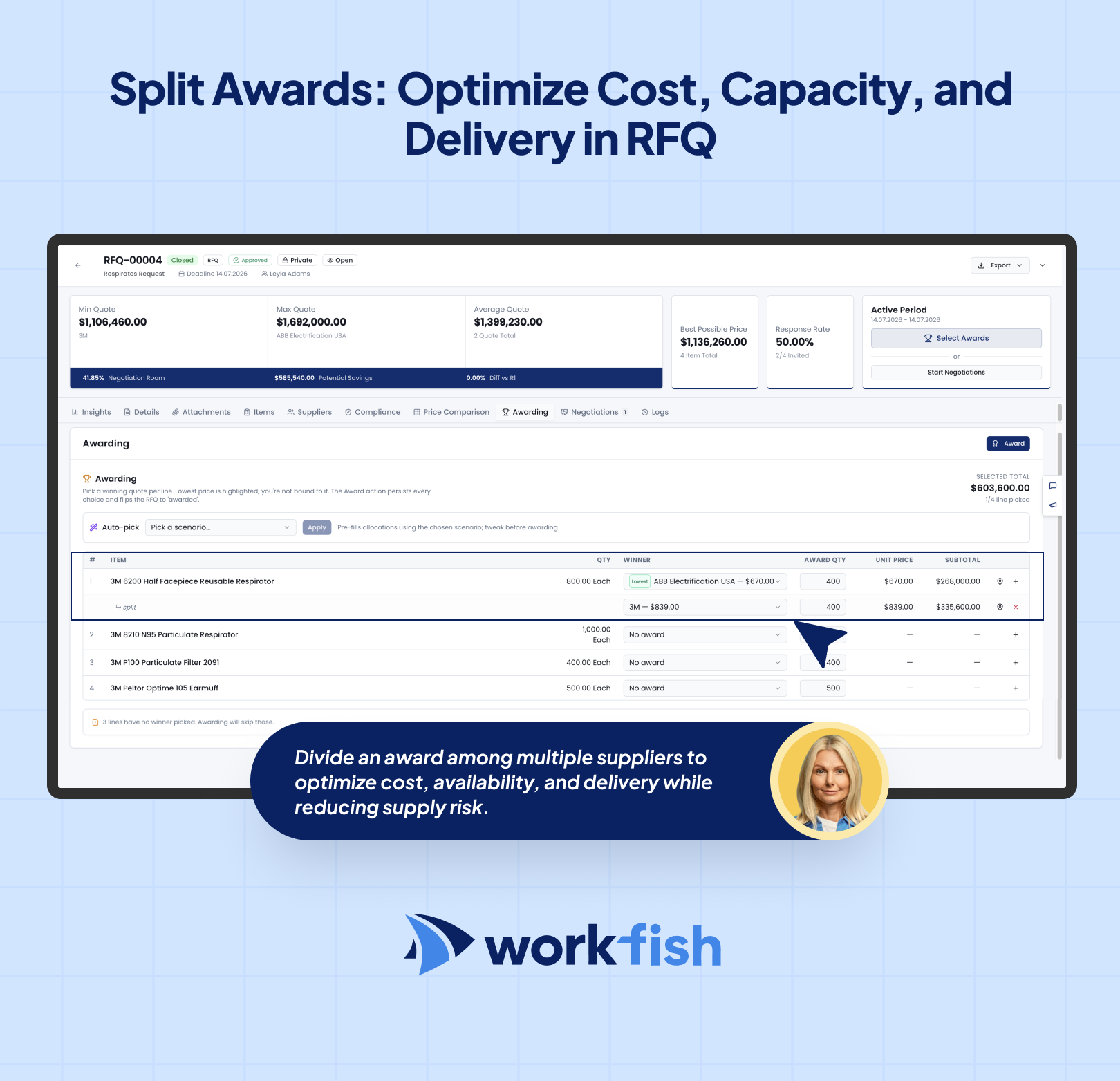
Supplier-side costs get factored in too. Freight, handling, and other charges flow into the purchasing process along with tax management, so the real cost of an award is visible before it's finalized not discovered afterward. Once an RFQ is awarded, purchase orders generate directly from it. Nothing needs to be rebuilt by hand, and nothing needs to be retyped into a separate system after the RFQ closes.
Supplier management gets hard to trust once onboarding, compliance documents, and RFQ communication scatter across email threads and spreadsheets. A supplier can look available in one file, restricted in another, and missing a required document in an email thread nobody remembers to check.
WorkFish's branded supplier portal keeps all of it tied to one record. Suppliers get onboarded by category. Submissions get reviewed. Changes get requested and tracked. Files get exchanged without losing the history of the conversation. That matters even more in a multi-entity group, since one supplier often serves several companies or locations at once - the record needs to support shared visibility without losing local context.
A few things run automatically in the background: document expiration tracking, supplier notifications, and bulk document requests. There's also RFQ-specific chat, plus a public-facing portal page for announcements and shared documents.
Purchase requests, purchase orders, and bills can flow into WorkFish directly from existing systems through API integration instead of getting typed in twice.
That matters for two reasons. First, it removes duplicate entry. Second, it means approval, RFQ, tracking, and supplier workflows can start the moment a record arrives, instead of waiting on someone to move it manually. The risk of skipping this is higher in a multi-entity business than in a single-company one: a manual handoff might be manageable for one company, but the same handoff repeated across many companies, locations, and suppliers turns into a reconciliation problem instead of a purchasing process.
Reporting in WorkFish mirrors how the organization is actually structured. Teams can drill down from workspace, to company, to location, to department down to purchase order status, total spend, and spend per item.
Strong procurement reporting depends on consistent data and useful operating benchmarks. That should make basic operating questions easy to answer: Which company is spending the most in a category? Which locations are waiting on received goods? Which suppliers keep winning RFQs? Which purchase orders are stuck in approval? If those answers require exporting several files and cleaning them up in a spreadsheet, the purchasing process is still fragmented in practice, even if it looks centralized on paper.
For deeper analysis, teams can turn to Enigma, Workfish's built-in AI assistant, and just ask it questions about purchasing workflows and spend, instead of building a custom report from scratch.
The value here isn't that every procurement task gets digitized on its own. Procurement is a connected process, from identifying a need to selecting suppliers, approving purchases, and managing orders. It's that the important parts of purchasing stay connected to each other.
WorkFish ties the whole thing into one workspace: multi-company structure, location and department access, user permissions, purchase approvals, custom purchase order forms, RFQ awarding, supplier-side cost capture, supplier onboarding, document tracking, supplier communication, API integration, reporting, and AI-assisted analysis through Enigma.
That's what makes this model useful specifically for multi-entity organizations. When the workflow stays connected, leadership can actually trust what they're looking at the approval path, the supplier record, the RFQ award, the purchase order, the report because it all comes from the same structured process, not five different ones bolted together.
Before choosing multi-company purchasing software, it's worth testing a platform against real operating scenarios instead of a generic feature list. A few questions tend to reveal the most:
Multi-company purchasing software works best when it reflects how the organization actually runs. A fragmented setup makes group-wide visibility difficult. A flat setup strips away the structure that companies, locations, departments, approvers, and suppliers depend on.
Workfish gives multi-entity groups one centralized workspace — with company-level separation, approval control, RFQ awarding, a supplier portal, API integration, reporting, and AI-assisted analysis, all working from the same connected process.